Vector Field Module
This module contains classes for creating and managing vector fields.
Usage Example
let domElement = document.getElementById("viewer");
// read atoms from file
const filename = "c2h6so.xyz";
fetchFile(filename).then((fileContent) => {
    const atoms = weas.parseXYZ(fileContent);
    atoms[0].newAttribute("moment", [1, 1, 1, 1, 1, -1, -1, -1, -1, -1], "atom");
    const editor = new weas.WEAS({ domElement });
    editor.avr.atoms = atoms;
    editor.avr.tjs.updateCameraAndControls({ direction: [0, 1, 0] });
    editor.avr.drawModels();
    editor.render();
});
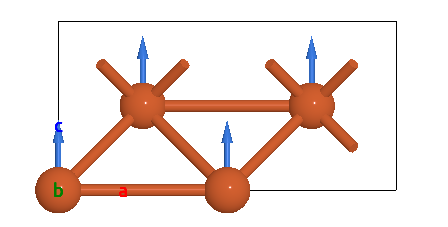
Hide Vector Field
The vector field can be hidden by:
editor.avr.VFManager.show=false;
Magentic moment visualization
The viewer has a default method to visualize the magnetic moment of atoms. One only needs to add the magnetic moment as an attribute to the atoms.
atoms.newAttribute("moment", [1, 1, 1, 1, 1, -1, -1, -1, -1, -1]);
Interactive phonon visualization
In order to update the vector fields when the atom is moved in a animation, the data of vector fields should be read from the atoms attributes.
<!doctype html>
<html lang="en">
  <body>
    <div id="viewer" style="position: relative; width: 100%; height: 500px"></div>

    <script type="module">
      import * as weas from 'https://unpkg.com/weas/dist/weas.mjs';

      let domElement = document.getElementById("viewer");
      // Create graphene
      let atoms = new weas.Atoms({
                            "symbols": ["C", "C"],
                            "positions": [[0.        , 0.        , 5.        ],
                                          [1.2300123 , 0.71013373, 5.        ]],
                            "cell": [[2.46, 0.0, 0.0], [-1.2299999999999995, 2.130422493309719, 0.0], [0.0, 0.0, 10.0]],
      });
      let editor = new weas.WEAS({ domElement });
      // Load atoms trajectory from phonon mode
      editor.avr.fromPhononMode({
        atoms: atoms,
        eigenvectors: [
          [
            [0, 0],
            [1, 0],
            [0, 0],
          ],
          [
            [0, 0],
            [-1, 0],
            [0, 0],
          ],
        ],
        amplitude: 1, // scale the motion of atoms
        factor: 1, // scale the length of arrow
        nframes: 50,
        kpoint: [0, 0, 0],
        repeat: [4, 4, 1],
        color: "#ff0000",
        radius: 0.1,
      });
      // control the speed of the animation
      editor.avr.boundary = [
        [-0.01, 1.01],
        [-0.01, 1.01],
        [-0.01, 1.01],
      ];
      // control the speed of the animation
      editor.avr.frameDuration = 20;
      editor.avr.modelStyle = 1;
      editor.render();
      window.editor = editor;
    </script>
  </body>
</html>